What is Value Vintage?
$30 Budget Vintage or ‘Value Vintage’ is a community built and maintained format created on the philosophy of creating a fun, interactive, and powerful play environment that isn’t hindered by the extreme prices of formats like Legacy or Modern.
The format utilizes the Vintage format’s Banned and Restricted list and adds the twist that your entire deck and sideboard must be under the limits of a $30 budget. An in-depth description of deck building restrictions can be found here.
Decklists submitted to events will have their legality determined based on the TO’s discretion. The most common method is having a submission window for lists and “locking in” your budget at time of submission. So you don’t have to worry about pesky price spikes.
Where Do I Start?
Anything is possible! Any archetype or strategy from throughout Magic’s history very likely has a form in our wonderful format in one way or another. A load of successful lists from a variety of archetypes and metagame information can be found in the Value Vintage discord here.
Not sure how to fill out the rest of your list? Too many of your cards more money than you expected? We’ve got you there! A (far from comprehensive) list of staples can be found here.
I Know What I Want to Play, Now What?
Time to get brewing! The program we use for deck building and price checking is the wonderful website moxfield.com. Don’t have a Moxfield account? Time to get started with the best deck building program the internet has to offer. Once you’ve got yourself situated and familiar with the website and the deck building features, time for a little bit of housekeeping.
Since we are a budget-restricted format, you have to make sure you’re getting the correct information as to your deck’s price is imperative.
First thing’s first, make sure that your account is showing you TCGPlayer prices, you can do so in your settings: https://www.moxfield.com/account/settings/affiliates

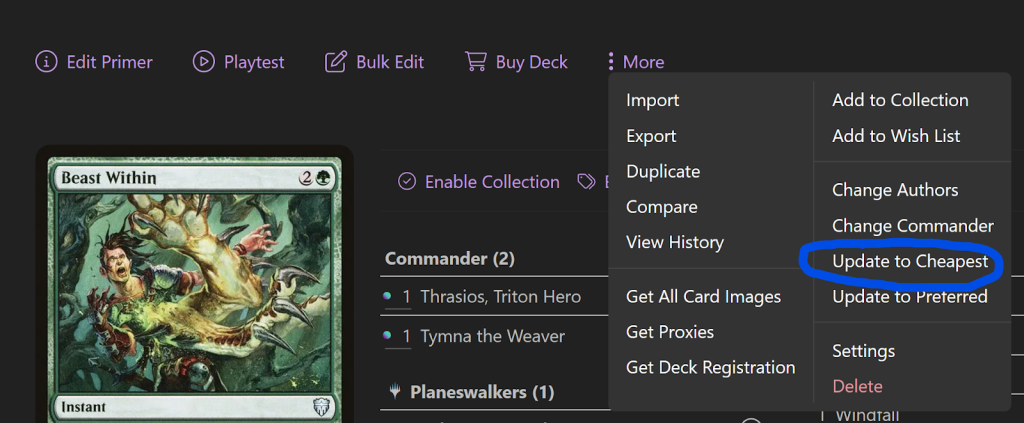
Second and finally, to make sure you’re using the cheapest possible version of your cards and to change them to the cheapest versions when updating your list, simply select the “update to cheapest” option from the three dot dropdown on your decklist.